How to Focus Better in Body Doubling Sessions: 15 Tips
Why the same room works better for some people than others
Two people can join the same body doubling session and leave with very different results. One finishes the draft they came for; the other spends fifty minutes half-working with a tab open to something else. The room, the timer, and the people were identical. What differed was how each of them used the session.
Body doubling works because another person's quiet presence makes it easier to start and harder to drift. If you are new to the method, what body doubling is explains the basics. This guide is about the next step: the small, practical habits that turn a MySession room from "I was there" into "I got it done."
The tips are grouped by when you use them: before the timer starts, while you work, and when focus is hard to find at all.
Before the timer starts
1. Set one clear, specific, realistic goal for this block. Not for the day and not for the project, but for the next 15, 25, or 50 minutes. "Work on the report" gives you nothing to check. "Draft the two paragraphs of the results section" does. A good goal has an end you can recognize, fits the block you chose, and has a first action you can picture. Our guide to writing a focus session intention has before-and-after examples.
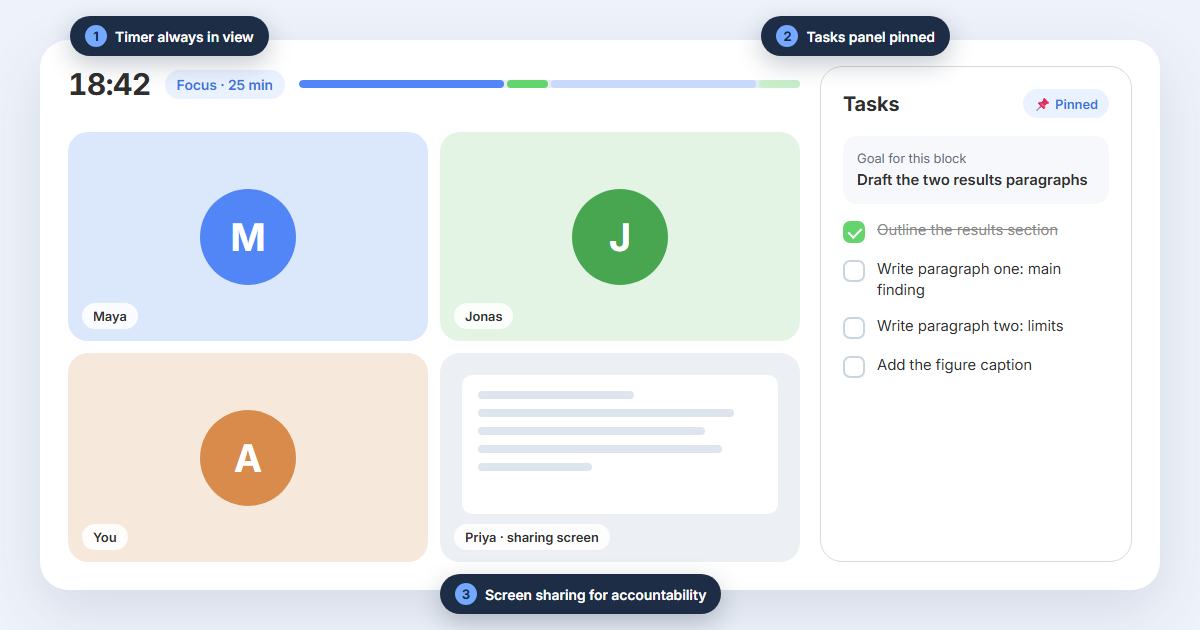
2. Add your tasks before the focus block begins. Open the Tasks panel and write down the two or three things you plan to do, with the most important one first. Deciding before the timer runs means you spend the block doing, not choosing.
3. Pin the Tasks panel so your priorities stay in front of you. A pinned panel keeps your list and the session timer visible while you work. Every glance at the screen reminds you what you said you would do and how much time is left, which makes it much harder to wander off into something unplanned.
4. Clear the space around the task. Put your phone out of reach, close the tabs this task does not need, and turn on Do Not Disturb until the break. If background noise distracts you, turn on a soundscape such as Gentle rain or Brown Noise.
While you work
5. Keep your camera on. Being seen is the core of body doubling. When other people can see you at your desk, opening a distracting site feels a little less private, and that small friction is often enough. If video is uncomfortable, point the camera at your hands or desk instead of your face, or use a background. Our guide to keeping the camera on or off covers the trade-offs.
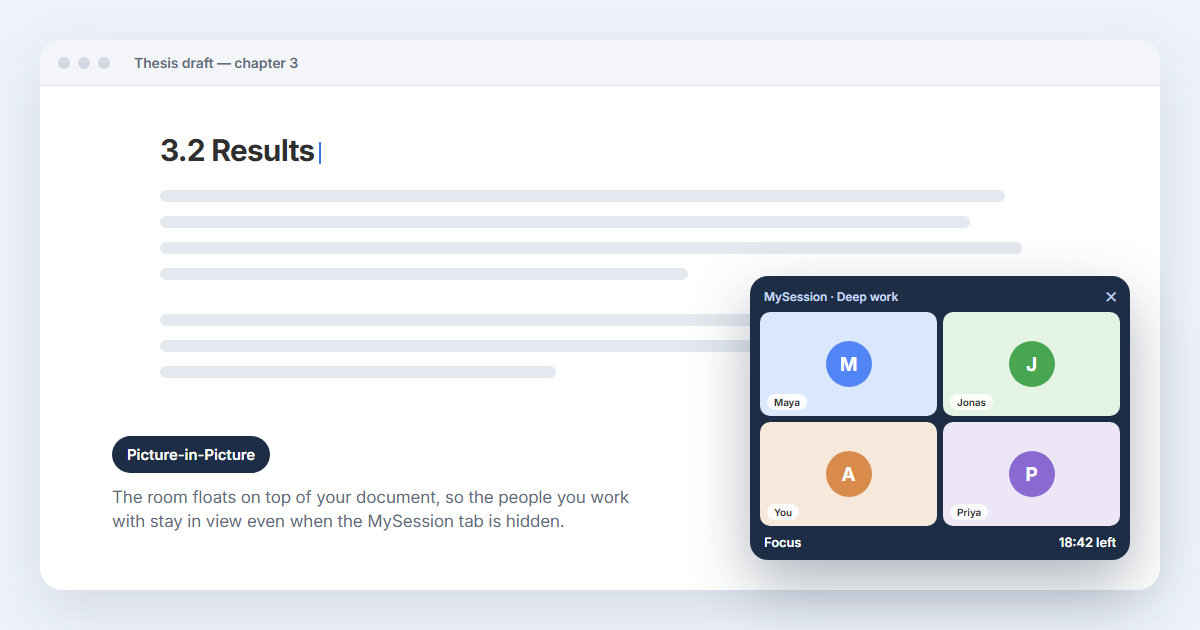
6. Turn on Picture-in-Picture when you work in another app. The moment you switch to your document, code editor, or slides, the room disappears behind it, and so does the feeling of working together. Picture-in-Picture keeps the room's video in a small floating window on top of your other apps, so the people you are working alongside stay in view the whole block. It is one of the simplest ways to strengthen the sense of shared presence.
7. Share your screen for an extra layer of accountability. If your work allows it, sharing your screen is the strongest commitment device a room offers: everyone can see whether you are in the document or in your inbox. It costs a little privacy, and it is not right for confidential work. But if you can trade some privacy for better focus, it is worth trying. Many people find they stop drifting almost completely once their screen is visible.
8. Take part in verbal check-ins and do not skip them. In sessions with verbal check-ins, each person says in a sentence or two what they plan to do and, later, how it went. It is tempting to stay muted and let others talk. Do not. Saying your goal out loud makes it real, and knowing you will report back at the end is a quiet deadline that keeps you moving. Keep it short: what you will do, what you did, and anything in your way.
9. Mute your microphone during focus, unmute for check-ins. The room stays quiet for everyone, and unmuting becomes a small signal that it is time to talk.
10. Keep a "not now" list. When a stray thought or a tempting side task appears, write it down in one line and go back to your work. You will deal with it on the break. Writing it down lets your mind let go of it without acting on it.
11. When focus slips, look at the room, then do the next small step. Seeing other people heads-down is a cue to get back to work. Do not try to win back the whole block; just do the next concrete action on your list.
If you cannot focus at all, start with baby steps
Some days even 25 minutes feels impossible. That is not a reason to skip the session; it is a reason to make it smaller. Attention works like a muscle you rebuild gradually, so start where you can actually succeed and increase from there.
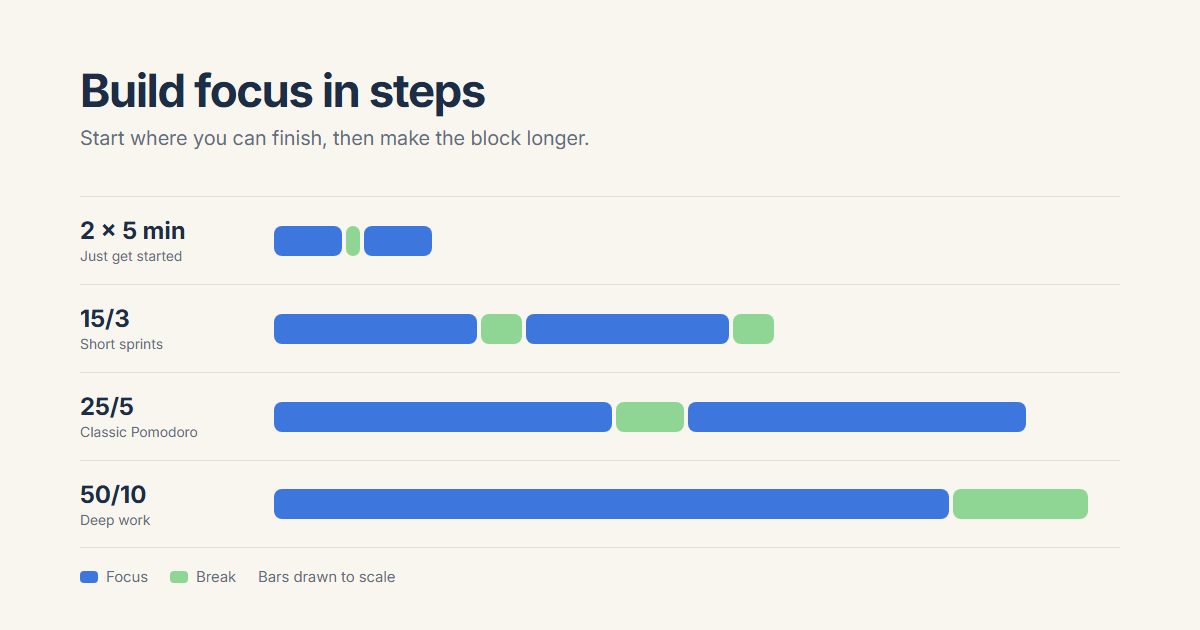
12. Begin with very short blocks. Create a session that starts with two 5-minute focus blocks. Five minutes is short enough that almost anyone can start, and finishing two of them builds a little momentum and confidence. MySession lets you build custom sprints with 5, 10, or 15-minute blocks when you create a session.
13. Step up gradually. Once short blocks feel manageable, move to a 15/3 session: 15 minutes of focus and a 3-minute break. Then try the classic 25/5 Pomodoro rhythm. When that feels comfortable, a 50/10 deep work session gives you room for work that needs setup and continuity. There is no prize for jumping straight to the longest block; a short session you finish beats a long one you abandon. If you are unsure which length fits a task, read how to choose a 25, 50, or 90-minute focus session.
If starting itself is the problem, how to start a focus session when you are stuck offers a ten-minute on-ramp for the hardest moments.
Between blocks and after the session
14. Take the break for real. Stand up, stretch, look away from the screen, get some water. Scrolling your phone on a break uses the same attention you are trying to rest, and the next block starts tired.
15. Before you leave, share what you got done and pick your next session. Telling the room what you finished closes the loop and makes the progress visible to you too. Choosing your next session time before you leave means tomorrow's start is already decided, which is often the hardest part.
A short checklist for your next session
- One specific, realistic goal for this block
- Tasks added and the Tasks panel pinned
- Phone away, extra tabs closed
- Camera on, Picture-in-Picture ready for other apps
- Screen shared if your work allows it
- Ready to speak at the check-in
- If focus is low: start with two 5-minute blocks
None of these habits is complicated, and you do not need all of them at once. Pick two that fit how you work, try them in your next session, and add more as they become routine. When you are ready, join a focus room and put them to work.